(Update) I’ve been using Setapp for 5 years (72 months).
Let me share my Setapp review with you. (My review is still valid in the year 2026.)

Setapp is a $9.99/month, $107.88/year subscription for Mac apps
It provides access to over 250 premium Mac & iOS apps.
If you use more than 4 premium apps regularly, it’s 100% worth it.
What is Setapp?
Setapp’s business model is similar to Netflix, but for Mac and iOS apps.
The brand is under the MacPaw company.
You pay one flat monthly or yearly fee and get access to the app library that can make your life easier.
All with full versions, no ads, and no upsells.

Here’s what you get:
- 250+ Mac Apps (and growing at the same price)
- Full pro version access (Not trial versions)
- One price, no hidden fees
- Auto-updates and no extra charges
- Easy cancellation in the system
Instead of paying $29 here, $45 there, and another $5 for that random to-do app, you get everything bundled.
Now, you pay once. Use many.
Why did I Subscribe to Setapp for 6 years?
I’m a solo digital marketer for service-based businesses.
I learn, write, produce, and automate my work all from my Mac.
Before Setapp, I was paying for apps like:
App | Pricing | Type | Notes |
|---|---|---|---|
CleanMyMac | $29.95/year | Yearly | |
Paste | $29.99/year | Yearly | |
MindNode | $24.99/year | Yearly | |
Craft | $95.88/year | Yearly | |
Downie | $19.99 one-time | Lifetime (+ fees) | Additional charges for version updates |
Permute | $14.99 one-time | Lifetime (+ fees) | Additional charges for version updates |
That’s about $187.81 per year—and that’s not even counting all the apps I currently use!
With Setapp, I pay only $107.88/year.
That’s an easy $79.93 saved every year!
Back then, my best friends asked me:
“Dude, you’re already paying for so many apps individually. Why don’t you just get Setapp?”
Then he showed me how Setapp works, and how much money I’d save by subscribing to just one service instead of multiple apps.
I gave it a shot—and never looked back.
It replaced 6 tools I used on a month-to-month basis.
I saved money and time.
When I find an interesting new app, I will try to search on Setapp or get an alternative in the ecosystem to use the one that fits me.
Just open Setapp, search for what you need, and install it. As simple as that.
Moreover, it’s easy to see which apps are worth using; just read the reviews in the member area.

The 7 Best Setapp Apps I Use on Mac Daily
I’m excited to share the 7 best Mac apps on Setapp that I use daily, and recommend you give them a shot!
Daily Apps | Purpose / Function | Ratings | Pricing |
|---|---|---|---|
Bartender | Customize and organize your menu bar | 99% | US$64.80 lifetime |
Mindnode Classic | Visual mind mapping | 99% | US$24.99/year |
Craft Plus | Note-taking and document writing | 95% | US$95.88/year |
Paste | Clipboard history manager (Copy & Paste) | 98% | US$29.99/year |
CleanMyMac | Mac system cleanup and optimization | 97% | US$29.95/year |
Canary Mail | All in one place, secure, encrypted email client | 84% | US$36.00/year |
CleanShort X | Advanced screenshot and screen recording tool | 99% | US$29.00 one-time + $19 update per year |
Total (Estimation) | US$250.77/year |
These 7 apps alone already make my daily workflow smoother and fully justify Setapp’s yearly cost, and I’m still finding my new favorites
In the 5 years, instead of paying $1,253.85 separately for these apps, I’ve only paid $539.40 through Setapp. That’s a saving of $714.45!
Setapp Pricing (Is it Worth it?)
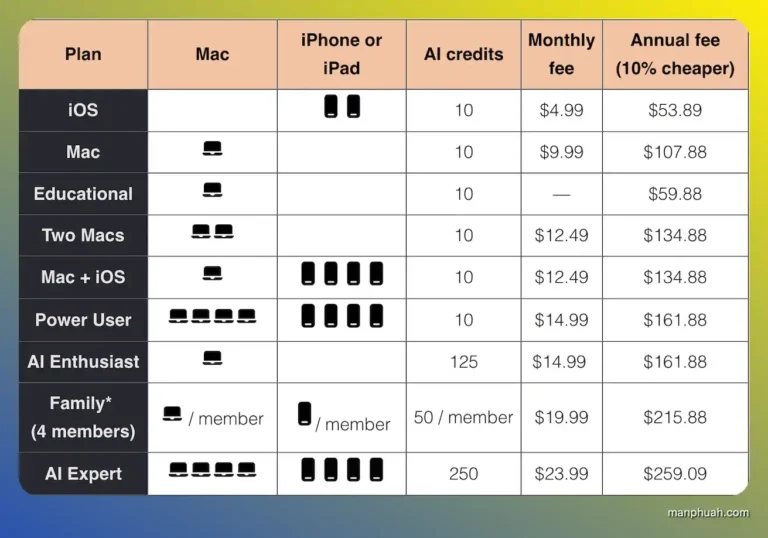
If you’re using Mac Apps like me, one person:
- Monthly: $9.99
- Yearly: $107.88
Hands down, nothing I can complain about.
If you like to have the combination of iOS and Mac for your personal use:
- Monthly: $12.49
- Yearly: $134.88
I think it’s still worth the pennies, as the package adds the 4 iOS devices for just an extra $2.50 monthly.
I’m not a Power User. So, I will never get the package. Go for it if you think it’s worth it.
- Monthly: $14.99
- Yearly: $161.88
Honestly, paying for multiple apps separately is a pain. I’m sticking with Setapp’s Mac package. If you’re after the best deal, it’s a no-brainer.
Who Is Setapp for? (And Who Should Skip It)
In my opinion, if you:
- Work remotely or freelance
- Use your Mac daily with apps
- Love clean, functional tools
- Hate surprise charges
- Save costs for the tool
…Setapp is for you.
It’s a top pick for writers, developers, marketers, productivity nerds, and students.
Skip Setapp if:
- You only need 1-2 tools
- You’re using Windows or Android
- You prefer a lifetime deal
- You don’t care about app updates or better support
Setapp Pros & Cons
Pros | Cons |
|---|---|
✅ One subscription, 250+ apps | ❌ Mac/iOS only |
✅ Great value (if you use 3+ tools) | ❌ Some apps may feel redundant |
✅ Great UX and search interface | ❌ Overwhelming if you’re not sure what you need |
✅ Easy to install and remove apps | ❌ Refund available (Conditions apply) |
✅ Provide a 7-day free trial | |
✅ Support the education plan | |
✅ Constantly updates, no ads. | |
✅ Easy cancellation on your account |
Important: Setapp’s refund has specific conditions. To avoid hassle, I strongly recommend using the full 7-day free trial to thoroughly test the apps before providing your credit card details.

Does Setapp Provide Student & Teacher Discounts?

Yes, it does.
The best deal is an educational plan, 50% off for students and teachers.
Unfortunately, Setapp doesn’t provide a monthly education plan, but a yearly plan is $59.88, not including tax.
As long as you have a valid .edu or academic email.
How to Get Started? (Install, Uninstall, and Cancel Setapp)
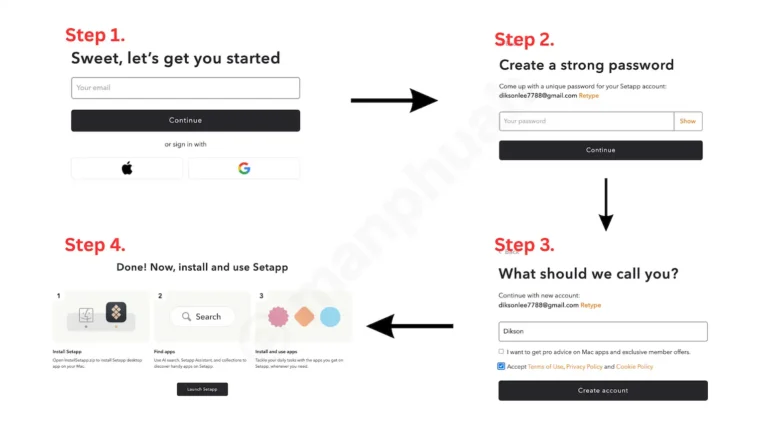
To install:
- Start your free trial here.
- Register your details (no credit card required).
- After signing up, a page will prompt you to download and install the app.
- Log in and enjoy your trial.
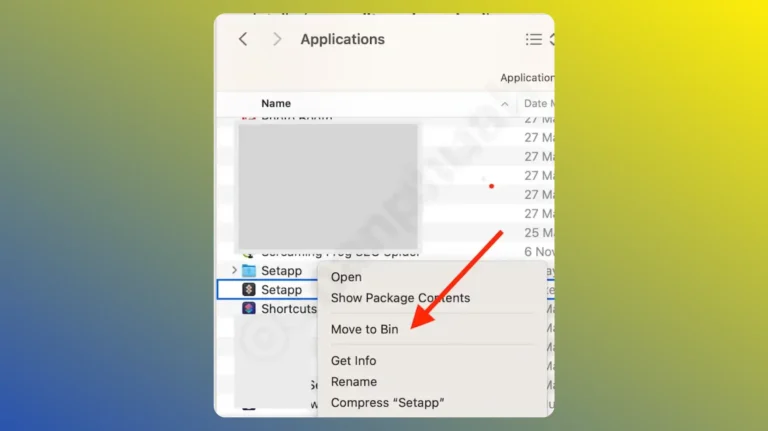
To uninstall: Click delete from your Mac application folder. Done. No shady leftover files.
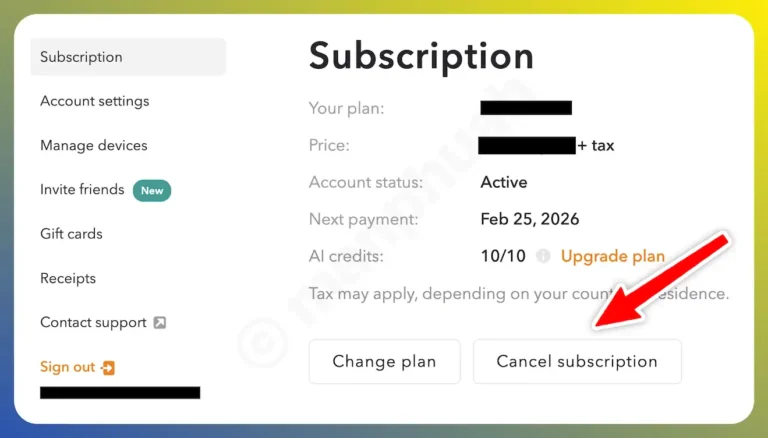
If you don’t feel like continuing the Setapp subscription, you can directly cancel it from the member area.
Is Setapp Safe?
Yes, absolutely.
I’ve used Setapp for over 5 years without a single issue or weird behavior on my Mac.
It’s developed by MacPaw, the team behind CleanMyMac, which has been trusted by Mac users since 2008.
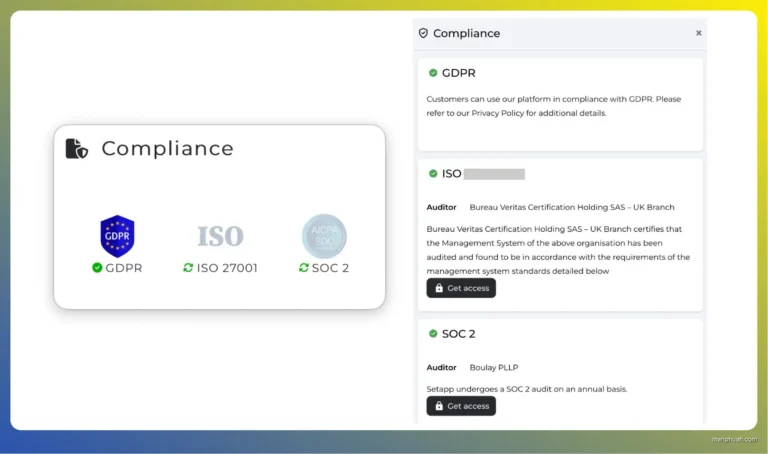
Setapp is regularly audited and certified by world-class security standards.
Plus, they have a dedicated team that thoroughly tests and reviews every app before adding it to the platform.
Is Setapp Still Worth It in 2026?
For me? Yep. (Screenshots tell the truth)
I run my content, SEO work, and entire digital life from my Mac.
Setapp saves me time, money, and headaches—no more worrying about app updates or surprise charges.
And yeah, I’m more productive with these apps.
If you regularly use at least 3-4 premium apps per month, Setapp quickly pays for itself.
My Score: 9.0/10
Why not a perfect 10?
Honestly, I think Setapp could do better at removing redundant or lower-quality apps and keeping pushing for more top-tier options.
Go the distance, you know?
Hope you enjoyed this review.
Now, it’s your turn to determine if Setapp is worth it.
Let me know in the comments!
Disclaimer: All pricing breakdowns in this article are based on the standard annual plan at the time of writing. Other plans, like student discounts or promotional bundles, may be available depending on eligibility or region.